

Nowadays, there is a growing need to have mechanisms that allows us to control who performed a particular action in a system. Rails provide us a lot of useful tools that help us build awesome solutions, but by default it does not offer us relevant tools to achieve this purpose. Most of the time what we get to know is the date of the last change of a particular record and the date of its creation, given by the table attributes updated_at and created_at respectively.
Thus, one of the concerns that we should keep in mind is to produce code that allows us to register important changes in our system that come from actions of a user, such as (create, update or destroy), while also having the ability to revert it to an earlier state if necessary, without ever compromising the performance.
As stated by Gadi Eichhorn in the Realise Data System’s post:
Business users aren’t perfect, they are just human. That means that when data is being inputted, there is a chance that it involves errors.
Most of the time securing historical system data is easily accomplished by doing daily backups of the entire database, though often we are not concerned with changes across the whole database, but rather to restricted set of data/records. So it makes sense to use a mechanism that best suits our needs.
My goal here is to focus our analysis on compare two of the most popular auditing/versioning gems, Audited and Paper Trail, in performing some of the tasks for which they were designed.
Both gems use tables in the database to store the data needed to help our system ‘control’/’oversee’ the actions that its users take. I have identified three fundamental questions that a gem must be able to answer in order to be an effective tool for auditing/versioning of data:
- Who, When and in What context was a given action taken in the system?
- How can I do it if I need to go back in time and reverse certain action?
- How can I do it if I need to track changes for an attribute, but only in certain specific conditions?
Setup
Let’s take the very simple example of a system wherein an admin user that manages a set of stores can manage their products as well.
Audited
Add the gem to your Gemfile:
gem “audited”, “~> 4.5”Then, from your Rails app directory, create the “audits” table:
$ rails generate audited:install$ rake db:migrateThis process will create an “audits” table where all actions performed by the user will be stored. Then we should add the following to the models we intend to audit:
Paper Trail
Add PaperTrail to your Gemfile.
gem “paper_trail”Add a versions table to your database and an initializer file for configuration:
bundle exec rails generate paper_trail:installbundle exec rake db:migrateThis process will create a “versions” table where all the actions performed by the user will be stored. Then we should add the following to the models we intend to audit:
Who, When and in What context was a given action taken in the system?
The systems we build in our daily work interact with many users that make changes to a lot of records in the data of our system. In some of those tables, it is sometimes imperative to know who performed the action on a record and the date of that action.
Audited
If we already use Devise as the authentication gem of our system (with the current_user configured), knowing who made the change using Audited is practically automatic. In this case all the requests that are made in the system are automatically assigned to the logged in user that executes the action, without the need for any extra implementation.
The audits table has a user_id column that will contain the current_user id, which will automatically associate the action taken to the user that did it.
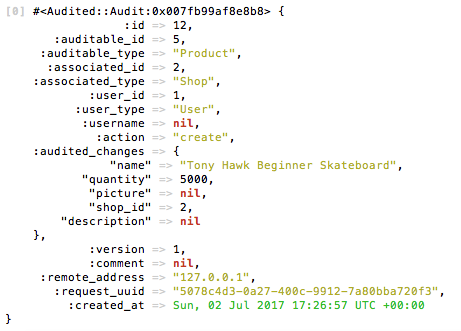
There’s also the possibility of adding a comment/note to each audit record we produce. In the creation of the above product we opted to not associate any comment to it, however this feature could be really useful if we want to save the context that lead to a certain action. If we have a system where a certain product can be updated from distinct areas, a useful way of helping us find the context of the action is to add an audited comment stating the area of the system from where the action was triggered.
Audited provides a simple way of doing that, due to its “audits” table already having an audit_comment attribute ready to store it, if needed. So we just need to set the desired comment text to the audit_comment attribute on every update of the record.
When we now check the information stored for the update on a product, we can see the stored audited comment.
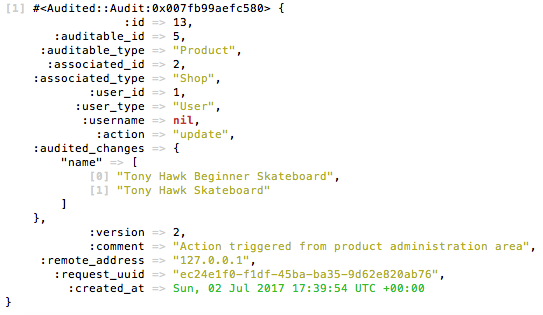
This was an optional comment assignment. However, Audited allows it to be mandatory if we intend to. We just need to add the following line to our Product model class:
audited :comment_required => truePaper Trail
Using Paper Trail to know the user who took a given action is also easy, however to achieve exactly the same goal as in Audited we need to add some implementation.
By default Paper Trail does not track the user who made the change in the entity, even if the system uses an assignment by current_user. However, the setup is quite simple, just add to our ApplicationController the following statement:
before_action :set_paper_trail_whodunnitThis ensures that the attribute whodunnit of the “versions” table stores the id of the current_user who made the action.
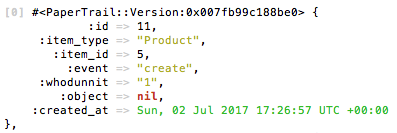
The whodunnit attribute, on its own just stores the current user’s id as a string value, which makes it more difficult, or at least less convenient, to access the respective User model.
To accomplish the same behavior as in the Audited gem we can then override the user method for Paper Trail. We should define it in class Version inside the Paper Trail initializer, which will enable us to directly access the User model.
How can I do it if I need to go back in time and reverse a certain action?
How many times, in your development environment, have you deleted a database record by mistake?
Probably too many times to count, and you probably solve it by restoring your Database with an updated dump, that still has the record you deleted, as well as some other tables updates.
But what if you make this mistake in production?
It is not viable to restore the entire database with an old dump, since the database should have suffered so much changes that will make it inconsistent for the user.
Paper Trail
Ryan Bates created an awesome RailsCast explaining how to implement an undo action for any record on our system, allowing us to return to a previous state of the record.
I will then let you listen to and enjoy this awesome cast !!
Audited
Audited also allows us to make a system identical to the one idealized in the Rails Cast using Paper Trail.
If you watched Ryan Bates cast, and the above implementation for the same goal using Audited, you can see that the only significant change is in the syntax of the revert method of our Product’s controller. Both gems are capable of doing a simple undo system effortlessly, by making use of the methods:
- reify
- revision
Both restore the record to its state before the update, so the main difference is in the approach to storing the audited/version records. Unlike PaperTrail that stores the pre-change version of the model, so you can retrieve the original version, Audited stores a version of the object as it currently is.
This different way of storing data is called Model Before vs Model After.
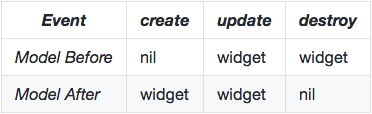
A clear advantage of the Model Before approach is that it does not waste space storing a version of the object as it currently stands, because if we look back to the previous question, we can verify that using Audited in the first audit record of the product creation, the audited_changes column stores all the creation attributes of the product (Model After). On the other hand, if we look back to the first version record of the product creation using Paper Trail, we see that the “object” column is nil, which means that the current state of the object is not stored in the version table (Model Before).
How can I do it if I need to save changes of an attribute, but it is only needed if it have a certain value?
We already saw that we can know who the user that made an action was, when he did it, and in which context he made it. We also learned how we can revert it, but let us now suppose that we just need to track all of that under a certain condition.
Let us once again consider our Shop management system, where each Shop has a lot of products and the admin should pay special attention to the product stock. It could be useful to restrict the ability to revert an action and to control who made the change, but only if the product stock gets above a certain value.
Let us see how we can achieve this in both gems !
Paper Trail
Conditionally storing a version of a record in Paper Trail can be achieved by adding a conditional instruction to the has_paper_trail statement in our model’s class. In our Shop management system, suppose that we just need to save the changes made on a product if the quantity is updated to values under 100. So we just need to add the following line in our Product model:
has_paper_trail if: Proc.new { |t| t.quantity < 100 }By having the above condition, Paper Trail will only store a record in the versions table if the update made on a Product reduces the quantity below 100.
Audited
Audited doesn’t provide an out of the box way of accomplishing the same behavior. However we are able to achieve the same result with some added implementation.
Audited lets us save a record without auditing it, so what we need to do is verify the desired condition on each update made on the record, and then choose either to perform the regular save, or, save without auditing it.
Let us see how our update method in the ProductsController became:
Applying this solution allows us to get the same result as in Paper Trail, however not in an elegant way, because if there is a need to apply it using different conditions for the Product model, it will make the developer’s work that much more difficult.
Conclusions
Both gems can be considered for that goal (Auditing and Versioning) ; in fact, the creator of Paper Trail has already said the he has been inspired by Audited. We’ve seen some particularities that make Audited mostly used to “Active Record User Stamping”, (checking the actions taken by a particular user), while Paper Trail is referenced as being in the “Active Record Versioning Area” (getting a timeline of changes in a record due to the larger set of options that Paper Trail offers in terms of functions and methods).
By answering those three questions we’ve seen that both gems give us the guarantee that they can help our systems to run a series of fundamental tasks allowing to control the actions users made in them. I have shown situations where Audited is better suited, and others where Paper Trail turns out to be a better option. So it’s up to us, as developers to decide which one of the two approaches best fits the type of system and needs at hand.
If you have any questions about this article let me know in the comments bellow.
I work at Runtime Revolution from sunny Lisbon to everywhere. We transform ideas into scalable products. I’ve learned a lot with this amazing team while helping our clients build their products.
Runtime RevolutionWe are Rails, mobile and product development experts. We can build your product or work with you on your project.runtime-revolution.com