

In any web application project a common and nowadays increasingly important requirement is security. Within this domain, possible breaches can originate in any number of ways, such as cross-site scripting, injection, phishing, etc.
Among these a common concern is communications eavesdropping in which the information transmitted between browsers and web servers can be seen by anyone along the network routes used. A typical way to approach this problem is to encrypt communications and make the actual content intelligible for any eavesdropper. In the context of web applications a common way to achieve this is SSL. In a sentence:
The Secure Socket Layer protocol was created by Netscape to ensure secure transactions between web servers and browsers.
― The Linux Documentation Project, What is SSL and what are Certificates?
One of the main mechanisms to establish this security is public/private key encryption. It works by ensuring that the data encrypted with the public key can only be decrypted by someone who has the private key. This perfectly suits the needs of internet interactions since it means that a server can expose its public key to clients so that they can send messages back to the server without these being seen (or secretly modified) by anyone that receives/routes them along the way to the server.
You might have noticed that this doesn’t address the security from the server to the browser, but this is easily solved by having the browser send a key to encrypt server→browser messages in its first encrypted message to the server.
Even though a somewhat simplified explanation, it gives us an idea of how we can have message exchanges between a server and a browser. This is done in a way in which the content of these messages should only be viewable in a decrypted state by the client browser and the server. The diagram below shows how these mechanisms are used when a secure webpage is requested by a browser to a web server.
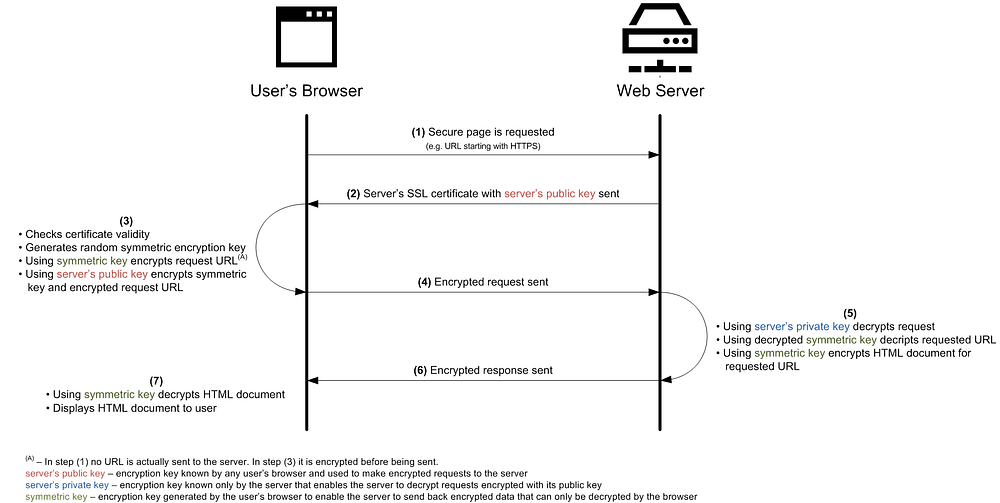
Beyond the privacy of the messages as a whole, another key aspect that is ensured by SSL is data integrity. By creating message digests and including these in the encrypted message, the receiver can check whether it has been tampered with since it was sent.

It is also important to mention that even though the several steps of establishing an SSL secure connection are handled by our browsers, the server’s public key can be checked by anyone. For example, in Firefox, access any HTTPS page and click the locker icon (see image above) right next to the URL and you can find it by viewing the associated certificate’s public key.
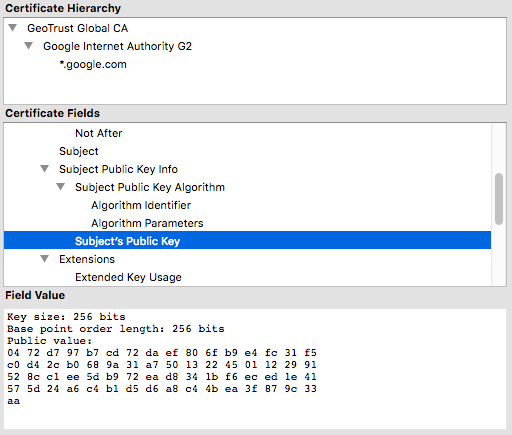
Bottomline: SSL helps ensure data integrity and privacy in server↔browser communication exchanges.
Why is it important?
There are many use cases for which SSL connections should be used, namely any interaction that requires privacy and integrity such as login mechanisms, private messages or online legal documents transfer. However, there is another important advantage of using SSL that is frequently overlooked but is key for any business, be it just starting or long-time running.
In line with Google’s many initiatives to push for a safer internet, the page rank of the results shown in their search engine has been influenced by whether a site is using SSL (HTTPS) or not (HTTP) since 2014. While the initial impact on the page rank in 2014 was minimal, it seems that it has been increasing.
Furthermore, browsers themselves are taking part in the migration from HTTP to HTTPS by making potentially dangerous situations increasingly more visible to users. Situations where this can be especially noticeable and even scare users off a website occur, for instance, when:
- In Firefox, you are logging in on an HTTP website (you can test it here) the browser marks the website as insecure and strongly advises against submitting sensitive data on this website once you focus the password field.
- In Chrome/Firefox, if you try to access a website with an expired SSL certificate (you can test it here) it gives you a full-page warning.
And there are many other situations. If you want to explore more you can easily try them out at https://badssl.com/ .
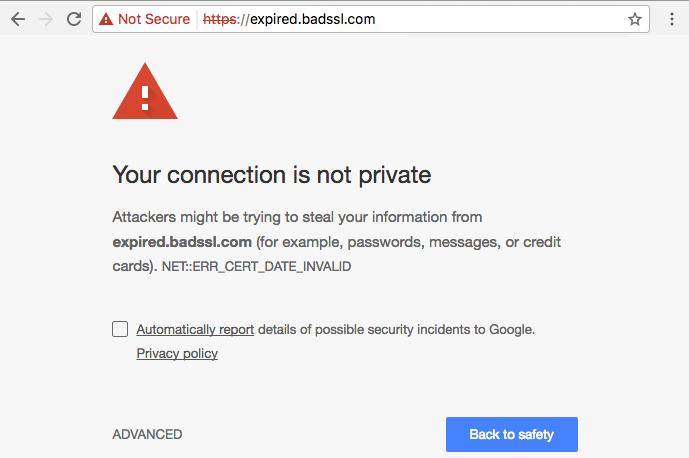
Such warnings have even led to a funny situation where a developer complained to Mozilla because the Firefox browser was warning users that data submitted on a login form of the complaining developer’s website might be compromised.
For online businesses it might literally be the case where visitors = $$$ so I would say that if security considerations alone were not enough (as they should!) this is yet another very strong reason to do the migration from HTTP to HTTPS (also known as HTTP over SSL or HTTP over TLS).
Bottomline: security concerns aside, sites running on HTTPS have better SEO regarding visibility and a diminished risk of scaring users off the website when personal information needs to be submitted.
Types of SSL certificates
A common use case for adding SSL to a web server consists of purchasing an SSL certificate that is associated with a single website’s domain name. Upon a request to the web server where such a certificate is installed, the browser checks its validity by checking with its set of trusted certificate authorities that the received public key matches the host name for which the request was made. For most web applications this is usually enough. However, there are some other use cases requiring more flexibility.
Another use case are organizations that want to have a certificate for all the sub-domains of a given domain name they own. In these cases a SNA wildcard SSL certificate can be used to match domain names using a wildcard and not “full-matching”. For example, such a certificate enables the Heroku cloud application platform to use a single certificate that is valid for all Heroku URLs because it matches the host address to *.herokuapp.com
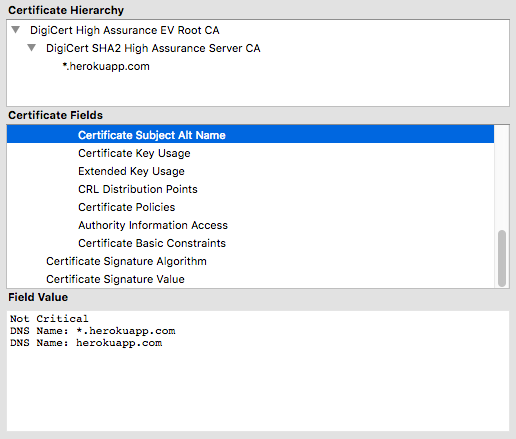
A final use case are companies that want to serve a certificate not only for sub-domains of a main domain, but serve different certificates to different domains altogether. In such cases SNI SSL certificates can be used. These certificates rely on an extension to the typical SSL protocol that includes the domain name for which the request is being made to be communicated to the server early on in the handshaking process. Based on this the server can serve different SSL certificates for different domain names.
Final Remarks
I hope this article helps web developers better understand how SSL works and the impact that it can have on the web applications they develop for their clients.
Adding to the security considerations, SEO optimization is a common request by clients because it can directly impact the visibility of their businesses and consequently their sales. Based on this, I believe that the small extra effort required to setup SSL and transition a website from HTTP to HTTPS, is really worth the effort!
Next week I’ll explore a hands-on example of how to easily setup SSL using Heroku and Cloudflare at no cost.
Nowadays I work at Runtime Revolution. Working here has been, and continues to be, a great learning experience. I’ve matured professionally as a developer, focusing on building and maintaining large scale Ruby on Rails applications.
Runtime RevolutionWe are Rails, mobile and product development experts. We can build your product or work with you on your project.www.runtime-revolution.com