

Marketing. The ever-evolving development of strategies that aid businesses reach their target market with valuable goods and services. Target a specific audience, select particular features and information that differentiates your business, and dive into the world of advertising. It can’t be that hard, can it? Let’s take a brief look at where marketing stands nowadays and why services such as Klaviyo are imperative to your success.
Modern-day marketing teams firmly acknowledge the importance of social media presence and generating proximity and familiarity with their clients via direct communication. The latter enables a highly customizable, unique and compelling way of interaction, primarily known as the long-standing techniques of email and SMS messages.
The ability to generate lists of current or potential consumers, coupled with automated emails which convey the feeling of handcrafted interaction, is still, to this day, as important as expanding into social media when it comes to a healthy business. (https://ms-mbalke.medium.com/email-marketing-and-sms-in-2020-eabb0c5b240d)
Klaviyo provides comprehensive eCommerce marketing automation tools which maximize the potential of messaging, allowing you to sync your technology stack with your website store, expanding your reach and closeness to customers by integrating user-generated content into your workflow. Let’s look into how this works and how you can apply it yourself.
Segmentation
The bread and butter of successful marketing. By dividing your customers into different groups given specific criteria, such as demographic, prospect customer or multiple purchasers, or even individual properties, you can pinpoint what email flow is best to pique a client’s interest.
Klaviyo is at the industry’s forefront when it comes to segmentation. With detailed and hand-tailored lists, you can segment emails and SMS by user-driven data, sending out surveys, or based on events such as a customer’s first purchase. You can also include information from third-party services such as Shopify into your email flow. In addition, the level of detail can go into cases such as “Send this email if customer looked X times at this product on X weekday”. The possibilities are endless and ready-to-go templates, such as a welcome series or abandoned cart flows, ensure you hit the ground running, coupled with an easy-to-navigate editor to create story-like email flows. Plus, seamless integration with Facebook audience targeting increases the tool’s power exponentially.
Analytics
How do you know if you are heading in the right direction? What strategies should you pursue, and how do you motivate your actions?
Analytics is the backbone which provides you with this answer.
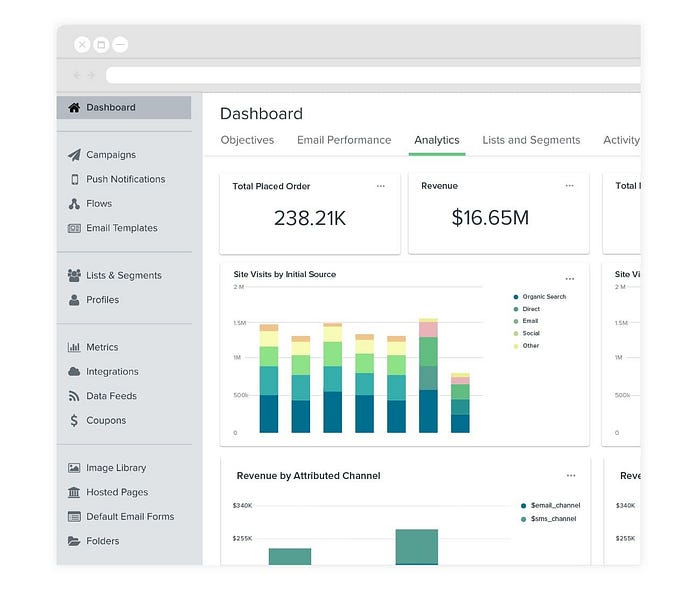
Klaviyo couples comprehensive Dashboards on the performance of your email campaigns, customizable reports on business execution, metrics on all of your incoming data sources, in-house benchmark comparisons to compare yourself to industry standards, and even predictive AI to figure out which customers are potential VIPs.
Look at the data, and make valuable decisions to improve your marketing strategy on the fly. Analytics are sure to provide you with the deep-dive knowledge you need to understand your customer’s needs.
Automation
Let’s talk automation. Klaviyo implements so-called “flows”, which are automated workflows that enable you to take advantage of your segmentation and analytics work and put it into practice!
When creating new flows, you can browse preset ideas not only to get a grasp on what is possible, but you can even improve on these, editing and combining different flows, tailoring them to your specific business needs.
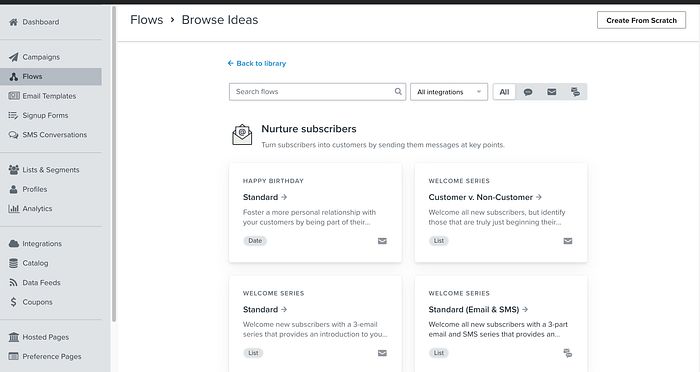
While editing, all your marketing data is available and can be integrated into your work, be it user or third-party-driven, and conditional splitting triggers ensure you can further customize given your client’s decisions.
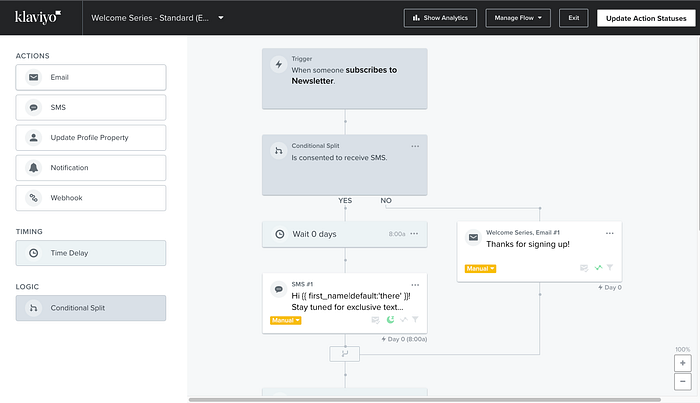
When you put one of these campaigns live, each email in the flow will feed into your analytics system, so you know how users respond, what path’s are the most prevalent and how well each email works for your business goals.
Implementation and Learnings
Now, how do you hit the ground running for integrating and building Klaviyo into your project to use all these fantastic features?
The developer’s documentation ensures you can get started quickly, providing an extensive API reference, custom guides, and helpful customer support.
Developer toolkits (SDKs) exist for many popular programming languages. However, I recommend implementing an HTTP client adapter if you want more control over the API calls, independence from potential deprecations, or wish to maintain a homogenous code base across other third-party services you might want to implement similarly. As a use case, as I currently work with Ruby, I suggest one of the most popular client adapters, the Faraday gem.
An example of how to call the Klaviyo service:
Install the faraday gem via terminal:
gem 'faraday'
bundle install
Have a blueprint class for connecting to APIs via Faraday, this is pretty much standard and you can find examples on the gem’s documentation. It will help you decouple, ease debugging and keep your code organized for other third-party services you might include in your project.
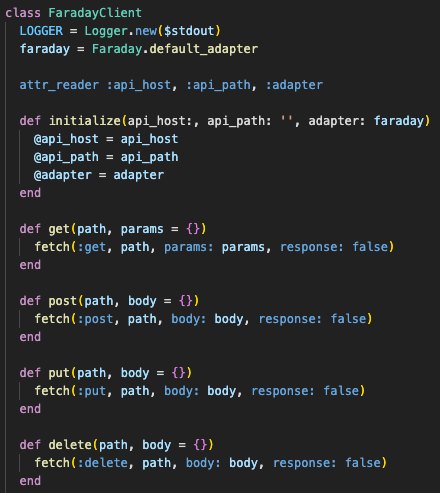
Now, with inheritance, we can connect to the actual Klaviyo API via our API Key/Site ID. You should also declare any segmentation list ID you will be needing to expand on here. Set up your developer environment by declaring these values in your env. development file and then you can use them when initializing your client like this:
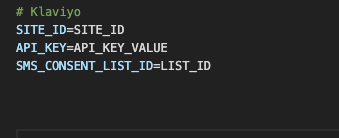
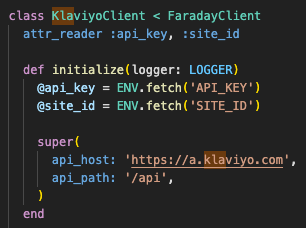
Depending on your hosting service, when pushing the code live API/Site ID/List ID definition for production may vary, but in the case of a PaaS such as Heroku, you define them in that service’s dashboard itself.
Ok, so you are ready to make API calls; where do you start? API documentation is your friend. The main thing to remember is Klaviyo has two core HTTP APIs sets.
Track & Identify which will be your bread and butter for sending events coupled with profile data; this will make up most of your traffic with Klaviyo and is designed for low latency & high throughput, not adhering to REST principles.
The Track endpoint is used to track a profile’s activity. Data is encoded in JSON format, and accounts can have up to 200 unique events to track by. Be aware that this endpoint limits payloads to 1MB. Special fields which are reserved by klaviyo are set via the customer_properties field, and are unique in starting with a $ sign. Values such as $email, $first_name, $phone_number, etc, can be updated this way and ensure profile identification. On succesfull call you will receive a 200 status code.
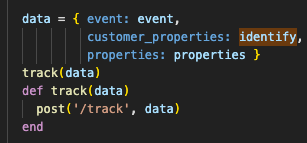
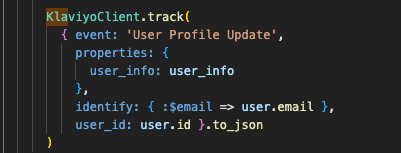
The identify endpoint is used to track and update a profile’s properties without a necessarily associated event, other than that, you are free to update any of the data fields would please, as well as customer_properties. On a successful request, you also receive a 200 status code.
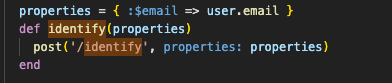
A good approach to start including Track & Identify calls in your current setup is to consider your product’s current purchase flow and determine the most relevant data to extract and send to Klaviyo. There are no limitations, but most importantly, you need to send at least one unique customer_properties field for each user so individual profiles are populated and retrievable. A popular choice is the customer’s email.
Consider drafting some potential emails and flows where you stub information you will send to Klaviyo so it is easier for you to decide where in your code to make the API calls, focus on the tracking event’s name to help you. Want to track someone updating something in their user profile? It probably makes sense to call that event something like “User Profile Updated” and include the API call in the region of the code after this transaction happens.
After you feel happy with the data available on your first user profiles, you can also import CSV files into the Klaviyo dashboard to populate your existing customer base.
The other APIs consist of RESTful APIs, which you use to manage objects and query the data in your Klaviyo account. Things like subscribing to lists & segments, retrieving metrics, scheduling campaigns, and profile deletions. These are high latency/low volume, which is extremely important to remember.
A while back the Track & Identify endpoints could also be called via the HTTP GET method, but this has recently fallen out of use. it is considered a legacy solution and to be avoided.
To identify users it is now recommended to use a dedicated RESTful API endpoint for searching to get a Profile’s ID, or directly use a customer_properties reserved identifier such as the email. Subsequently retrieve or update that profile via GET and PUT requests respectively, to a dedicated person endpoint, as shown in the images below.
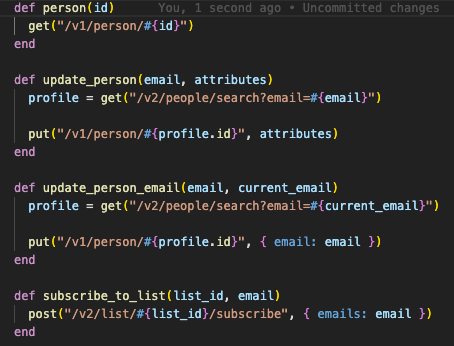
Remember the bottleneck I talked about before? In the subscribe calls this comes in handy. Imagine you have a list where you subscribe all your clients who consent to receive SMSs; you do not want to subscribe to this list with big batches of profiles. As a result, your calls will be throttled or denied as you hit an established bottleneck, causing a loss of valuable time and data without quite understanding why. Try to keep these calls as granular as possible, as they are designed for particular and niche use cases. Need to update a given data field for all your users? Track & Identify API and CSV are your friends.
As a developer, most of your work after the basis is set up will be working with your marketing team and adding new data fields to user profiles as your business evolves. Specific campaigns will always require tweaking or further additions. The magic happens by integrating your information into these. Imagination and proper teamwork will help you strike the most effective reach to your customers.