
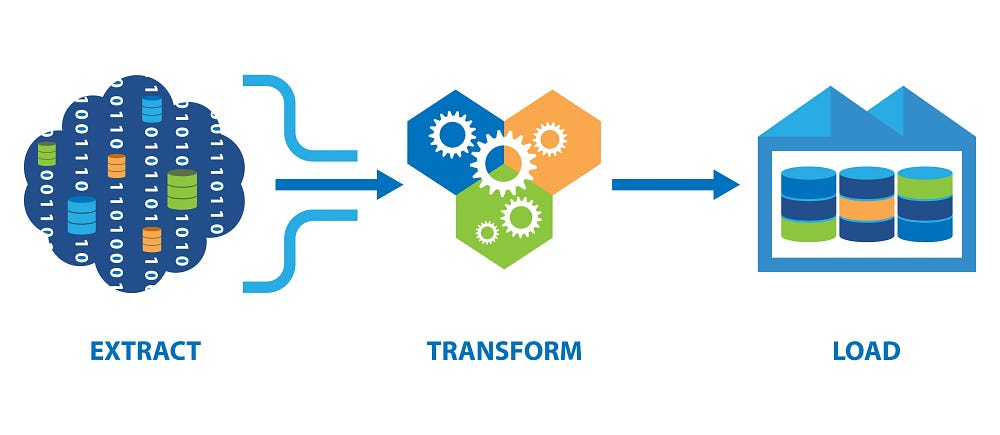
How does raw data become clean and structured information? The answer lies in ETL: Extract, Transform, Load.
Extract, Transform, Load is the backbone of modern data integration. It’s the process that takes data from its source, cleans it up, transforms it into a usable format, and loads it into a centralized system.
In this post, we explore how ETL works, why it’s critical for businesses, how it can be critical with the right security, and how it lays the foundation for decision-making. Whether you’re a data engineer, an analyst, or just curious about how data flows behind the scenes, this introduction to ETL provides the tools and know-how to write your own ETL with SFTP servers.
Groundwork
Let’s start basic on our ETL. We first need to extract the contents of our SFTP server securely, and that includes taking advantage of Net::SFTP, a commonly used protocol, the Secure File Transfer Protocol SFTP, which adds additional security.
We need to store and be able to call our accounts securely with credentials and options, so we create a basic rails model designed for SFTP connections.
class FtpAccount < ApplicationRecord
  validates :address, :username, :ssh_key, :port, presence: true

  # Initiate SFTP connection
  def init_sftp(timeout = nil)
    sftp_opts = {
      keys: [], # Array of file paths to private keys
      key_data: [ssh_key], # Array of raw private keys data
      keys_only: true, # Ensures that only keys are used for authentication
      non_interactive: true, # Prevents user input
      # Appends from the SSH client to the server's advertised algorithms
      append_all_supported_algorithms: true,
      # Specifies port of SFTP server
      port:,

      # Optional: Sets the verbosity level for debugging
      # verbose: :debug,
    }

    # Maximum wait of client for connection
    sftp_opts[:timeout] = timeout unless timeout.nil?

    Net::SFTP.start(address, username, **sftp_opts)
  end
end
We decided to store our private key on the database but you could add a path and save it on the disk and it would work regardless, you just need to pass a path for each key to the keys option.
Now, since we can connect to the SFTP server, we use sidekiq to handle our background jobs. In this case, our main jobs are responsible for all the steps: extracting, transforming and loading. Starting our ETL is as simple as calling from the rails model to start the workflow.
class DataTransformation < ApplicationRecord
  # Includes methods like info_log (puts method on steroids)
  include Loggable

  # State machine to track transformation
  include TransformationStateMachine

  # FtpConnection stores IDs of both incoming and outgoing ftp accounts
  belongs_to :connection, class_name: "FtpConnection"

  # Each DataTransformation is whole workflow
  # Each DataFlow is a file being transformed
  has_many :flows, class_name: "DataFlow", dependent: :delete_all

  # Start workflow for transformation
  def start_workflow(*options)
    info_log "start workflow [id=#{id}]"
    start_timestamp!
    batch = Sidekiq::Batch.new
    batch.description = "[#{id}] Data Transformation"
    batch.jobs do
      DataOrchestrationJob.perform_async(id, options.map(&:stringify_keys))
    end
  end
end
Previous code reflects the need to start the whole process but each file depending on the needs calls its own pipeline transformation thus allowing multiple files to be transformed in the background.
# frozen_string_literal: true

# Each DataFlow is each file
class DataFlow < ApplicationRecord
  include Loggable

  # State machine tracking transformation of file
  include FlowStateMachine

  belongs_to :data_transformation

  # Run data flow
  def run(configuration = nil)
    # Create pipeline and then run it!
    pipeline = ::Pipelines::Builder.create_pipeline(self, configuration)
    ::Pipelines::Builder.process_pipeline(pipeline)
  rescue StandardError => e
    error_log e, 3
    raise e
  end
end
All blocks are in place. Now, all we need is to add the jobs and state machines which use the building blocks we added.
State Machines
All transformations and flows need a state machine to save our progress through the chain and enable passage through the jobs.
State machines can be highly effective for managing ETL processes, as they offer a structured way to handle the sequential and conditional logic inherent in ETL workflows.
The aasm Ruby gem (acts_as_state_machine) is a robust library for adding state machine functionality to Ruby classes. It is especially useful in managing workflows, transitions, and states for models in Ruby on Rails or standalone Ruby applications.
Next blocks of code add our simplified state machines:
# frozen_string_literal: true

module FlowStateMachine
  extend ActiveSupport::Concern

  included do
    include AASM

    aasm column: :status do
      state :processing, initial: true
      state :processed
      state :processed_with_errors
      state :failed

      event :process, before: :start_timestamp! do
        transitions from: %i[pending], to: :processing
      end

      event :fail, before: :finish_timestamp! do
        transitions from: %i[processing], to: :failed
      end

      event :complete, before: :finish_timestamp! do
        transitions from: %i[processing], to: :processed
      end

      event :complete_with_errors, before: :finish_timestamp! do
        transitions from: %i[processing], to: :processed_with_errors
      end
    end

    # @return [Boolean]
    def start_timestamp!
      update(started_at: Time.current) if respond_to? :started_at
    end

    # @return [Boolean]
    def finish_timestamp!
      update(finished_at: Time.current) if respond_to? :finished_at
    end
  end
end# frozen_string_literal: true
module TransformationStateMachine
extend ActiveSupport::Concern
# .....
aasm column: :status do
state :waiting_for_files, initial: true
state :files_missing
state :files_fetched
state :preparing_files
state :prepared_files
state :prepared_files_missing
state :processing
state :processed
state :processed_with_errors
state :delivering
state :delivered
state :failed
# event used during orchestration only
event :files_fetched_incomplete, before: :finish_timestamp! do
transitions from: %i[waiting_for_files], to: :files_missing
end
event :files_fetch_success do
transitions from: %i[waiting_for_files], to: :files_fetched
end
event :prepare_files do
transitions from: %i[files_fetched], to: :preparing_files
end
event :prepare_success, before: :finish_timestamp! do
transitions from: %i[preparing_files], to: :prepared_files
end
event :process do
transitions from: %i[prepared_files], to: :processing
end
event :deliver do
transitions from: %i[processing], to: :delivering
end
event :delivery_complete, before: :finish_timestamp! do
transitions from: %i[delivering], to: :delivered
end
# Automatic trigger
event :fail, before: :finish_timestamp! do
transitions from: %i[pending], to: :failed
transitions from: %i[delivering], to: :failed
transitions from: %i[files_fetched], to: :failed
transitions from: %i[processing], to: :failed
transitions from: %i[processed], to: :failed
transitions from: %i[preparing_files], to: :failed
transitions from: %i[waiting_for_files], to: :failed
end
# Manual trigger
event :kill do
transitions from: %i[waiting_for_files pending], to: :dead
transitions from: %i[processing], to: :dead_processing
transitions from: %i[loading], to: :dead_load
end
end
# @return [Boolean]
def start_timestamp!
update(started_at: Time.current) if respond_to? :started_at
end
# @return [Boolean]
def finish_timestamp!
update(finished_at: Time.current) if respond_to? :finished_at
end
end
end
# .....All our state machines can update more than your status. If you noticed we added timestamps for both to complete the cycle.
Sidekiq Pro
Extracting and loading are essentially the same thing with small differences, meaning there’s both an action and connection. The difference is one does download! and the other one upload!, using an SFTP session.
The difference in code on both is trading all desired variables and classes, like for example: Helpers::ExtractFiles.extract_files to Helpers::ExtractFiles.load_files as one example so it is rather simple to trade both jobs.
# frozen_string_literal: true

# ExtractJob inherits from DataJob (Sidekiq::Job)
# All you need to know it gives me access to data_transformation
class ExtractJob < DataJob
  sidekiq_options unique_for: UNIQUENESS_LOCK_TIMEOUT

  attr_reader :sftp

  # Fetches any files that match client configurations
  def perform!(options)
    extracted_files = []

    # Start SFTP connection attempt
    if init_sftp(data_transformation.connection.incoming)

      # Extract files from SFTP server
      downloaded_files = Helpers::ExtractFiles.extract_files(
        sftp, extracted_files, data_transformation, options
      )
    end

    if extracted_files&.any?
      # Trigger success event on state machine
      data_transformation.files_fetch_success!

      # Trigger transformation jobs upon successfully extraction of files
      batch.jobs do
        TransformJob.perform_async(data_transformation.id, downloaded_files, options)
      end
      return
    end

    if data_transformation.pending?
      # Trigger incompleteness of fetching files on state machine
      data_transformation.files_fetched_incomplete!
    end
  rescue StandardError => e
   # Trigger fail event on state machine
    data_transformation.fail!

    # Cleanup any temporary files upon error
    DataTransformation::FileOperations.cleanup(extracted_files)
  ensure
    # Explicitly close the SFTP session
    sftp&.close_channel
  end

  private

  # Starts connection
  def init_sftp(ftp_acc)
    @sftp = ftp_acc.init_sftp
    true
  rescue StandardError => e
    @sftp = nil
    false
  end
end
In case you didn’t notice, I have a data_transformation object that has all properties to be used in further communication like both connections and states to track every stage. I added a base job to have by default the variable but it is a standard sidekiq job.
Before kickstarting the whole process, helpers do the heavy lifting but the main logic is the following:
# ===============================================================
#                    DOWNLOAD FILES
# ===============================================================

# ....
sftp.dir.foreach(remote_path) do |entry|
  begin
    # Add contents of download to temporary file
    remote_source_path = File.join(remote_path, entry.name)
    data = sftp.download!(remote_source_path)
    entry_extension = File.extname(entry.name)
    entry_name = File.basename(entry.name, entry_extension)
    tempfile = Tempfile.create([entry_name, entry_extension])
    File.write(tempfile.path, data)

    # Remove any similar .old files for no renaming issues
    # Then, rename initial file on source SFTP server in case you still need it
    sftp.remove("#{remote_path}/#{entry_name}.old")
    sftp.rename!(
      "#{remote_path}/#{entry.name}",
      "#{remote_path}/#{entry_name}.old",
    )
  rescue Net::SFTP::StatusException => e
    info_log e.message, 1
    next
  end
  # ....
end

# ===============================================================
#                    UPLOAD FILES
# ===============================================================

# ....
uploading(files).each do |destination|
  sftp.upload!(
    destination.source_file_path,
    destination.remote_destination_path,
  )
end
# ...
private

def uploading(files)
  files.map { |file| UploadFile.new(file) }
end
It’s really simple to create helpers with the above logic which in turn enables both endpoints but never forget to close the connection in any scenario after use. Since we want to handle multiple files, we need to flow into multiple streams for each file and add complexity by calling our pipeline (Kiba) which transforms the contents of our source files.
We now just need to connect both transformation and flow jobs for the “magic” to happen. Our code is as follows:
# frozen_string_literal: true

class TransformJob < DataJob
  sidekiq_options unique_for: UNIQUENESS_LOCK_TIMEOUT

  def perform!(sources, options)
    if data_transformation.pending?
      info_log "Ignoring, not pending", 1
      return
    end

    # Trigger processing on transformation state machine
    data_transformation.process!

    # Create a batch for transformation
    info_log "Running data transformation with id=#{data_transformation.id}", 2
    transform_batch = Sidekiq::Batch.new

    # Add callback on complete - when all jobs in the batch have run once, successful or not.
    transform_batch.on(:complete, "DataTransformation::Callbacks#upload_files", { dt_id: data_transformation.id })
    data_transformation.update(bid: transform_batch.bid)

    # All sources (files) trigger theire own workflow
    # Which contain all necessary temporary files, initial paths and destination paths
    transform_batch.jobs do
      sources.each do |source|

        # Our data flow, stores the source of a file (paths/names of file)
        # and origin of transformation for further logic
        data_flow = DataFlow.create!(data_transformation:, source:, jid:, started_at: Time.current)
        FlowJob.perform_async(data_transformation.id, data_flow.id, options)
      end
    end
  rescue StandardError => e
    # Any error instantly cleans files and triggers failure states
    error_log e, 1
    data_transformation.fail!
    DataTransformation::FileOperations.cleanup(sources)
  end
end# frozen_string_literal: true
class FlowJob < DataJob
sidekiq_options unique_for: UNIQUENESS_LOCK_TIMEOUT
def perform!(data_flow_id, options)
# Check if transformation still processing
if data_transformation.processing?
data_flow = DataFlow.find_by(id: data_flow_id)
# Run our Kiba pipeline
data_flow.run(configuration_id)
# Trigger completeness on transformation state machine
data_flow.complete!
else
info_log "skipped", 2
end
rescue StandardError => e
# Any error instantly cleans files and triggers failure states
data_flow = DataFlow.find_by(id: data_flow_id)
data_flow.fail!
DataTransformation::FileOperations.cleanup([data_flow.source])
info_log "Error: #{e.message}", 2
end
endOur batch/transformation has all jobs that asynchronously transform each of the files according to a set of options that can be added at any stage.
Kiba
Our last step is not as challenging as the previous section. Any class upon creation, upon calling process_pipeline, follows a standard flow which means preparing, validating, and executing before cleaning up the files that were generated during or upon any error, in the file below.
# frozen_string_literal: true

module Pipelines
  class Builder
    include Loggable

    def self.create_pipeline(data_flow, options)
      Pipelines::Dummy.new(data_flow:, options:)
    end

    def self.process_pipeline(pipeline)
      # Step 1 - run prepare step
      pipeline&.prepare

      # Step 2 - validate
      pipeline&.validate

      # Step 3 - execute
      pipeline&.execute

      # Step 4 - cleanup
      pipeline&.cleanup
    end
  end
end
In this blog, we created a dummy pipeline, and the key takeaways are the methods: source, transform, and destination which goes into more details on the gem’s wiki, but we provide a small glimpse within the following code:
require "csv"

module Sources
  class CsvSource
    def initialize(params)
      @source_file = params.fetch(:source_file)
    end

    # Loop rows of CSV
    def each
      @source_file.each do |row|
        yield(row)
      end
    end
  end
end# frozen_string_literal: true
require "csv"
module Destinations
class CsvDestination
def initialize(params)
@destination_file = params.fetch(:destination_file)
end
# Write row
def write(row)
out_row = row.to_h.except(:line_number)
unless @headers_written
@headers_written = true
@destination_file << out_row.keys
end
@destination_file << out_row.values
end
# Close output file
def close
@destination_file&.close
end
end
endmodule Transformations
class PassThrough < Transformations::Base
def transform(row)
# DO SOMETHING
row
end
end
end# frozen_string_literal: true
module Pipelines
class Dummy < Pipelines::KibaBase
# Kiba context for pipeline
def kiba_context_method(pipeline)
Kiba.parse do
source Sources::CsvSource,
source_file: pipeline.source_file
transform Transformations::PassThrough
destination Destinations::CsvDestination,
destination_file: pipeline.destination_file
end
end
end
endThe transformation occurs on the transform method which all pipelines have and upon completion updates the content of the files, row by row. One transformation has many flows which upon passing through our kiba pipelines, transform their contents and upload them to our outgoing connection, leading to the last step.
For all transformation batches, we add a callback to our TransformJob. This means that upon completing their journey on our dummy pipeline, they come back to our success callback. This, in turn, calls LoadJob which finishes our logic and checks if the files were correctly transformed or not. In any case, they leave traces of their activity, thanks to our state machines.
# frozen_string_literal: true

class DataTransformation::Callbacks
  include Loggable

  # On complete of all pipeline workflows
  def upload_files(status, options)
    data_transformation = find_data_transformation(options["dt_id"])

    # Check if process failed or files are empty
    raise if data_transformation.flows.empty?
    raise if data_transformation.failed? || data_transformation.dead?

    # Trigger last state where you upload the files
    data_transformation.deliver!

    # Check if there are no failures
    if status.failures.zero?

      # Every upload job belongs to a destination file
      batch = Sidekiq::Batch.new
      batch.description = "[DT: #{data_transformation.id}] DataTransformation::Callbacks#upload_files"

      # All files that didn't trigger any errors get uploaded
      sources = data_transformation.flows.where(status: "processed").map(&:source)
      batch.jobs { UploadFilesJob.perform_async(data_transformation.id, sources) }
    else
      raise
    end
  rescue StandardError
    data_transformation.fail!
    info_log "Some jobs in the batch failed."
  end

  private

  def find_data_transformation(id)
    if id.blank?
      info_log "No Data Transformation id received", 1
      raise
    end

    data_transformation = DataTransformation.find_by(id:)

    if data_transformation.blank?
      info_log "No Data Transformation with id #{id}", 1
      raise
    end

    data_transformation
  end
end
Conclusion
As the volume and variety of data continue to grow, the importance of ETL will only increase. Whether you’re streamlining operational workflows, building advanced analytics dashboards, or feeding machine learning models, a well-designed ETL pipeline ensures your data is accurate, consistent, and actionable.
This post gives you the tools for this age of data with confidence and the necessary background to build your own complex ETL with the added bonus of extra security supported by our friend the SFTP protocol.
Hopefully you should be able to harness the potential of your data, and let ETL pave the way.
Tools:
https://github.com/aasm/aasm
https://github.com/sidekiq/sidekiq
https://github.com/thbar/kiba