

Most front-end applications are currently using Node.js,which is a proven JavaScript runtime. It allows most developers to create reliable client and server applications. However, what if its creator wanted to improve it and remove most of the existing bloat it had and add some tooling, like linting and testing, by default?
This is when Deno arrives to be an improvement to Node. It is a new JavaScript Runtime created by the original Node creator, Ryan Dahl. Deno has native support for Typescript, JSX and TSX. It also includes tools that are normally added to a Node project by external packages such as linting, testing, code format. It also aims to remove the bloat from the code we create for our applications. More can be read in its official documents
For comparing Deno vs Node usage, it is assumed that we want to create a React Single Page Application, which will be created using both runtimes.
Setup:
Node
Using yarn as our package manager, run the command:
yarn create vite
Following the instructions on the screen, type the project name. In this example vite-node-example, select the framework React and finally select variant Typescript. After which you can go in to the folder and run yarn install.
This generates the following files:
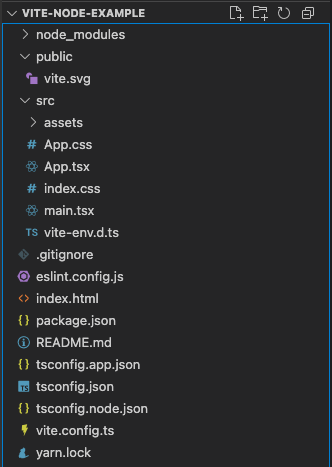
It creates the expected files for the start of React SPA. It includes config file for ESLint which is important to help ensure our code is written with proper structure while we are building the application. Additionally because we selected the variant Typescript it also generated a config file for it.
Deno
In Deno the setup is done using the following command:
deno run -A npm:create-vite-extra
Then follow the instructions on the screen, in this case, type the project name, vite-deno-example, select the template deno-react and finally select variant TypeScript.
It generates the following folder:
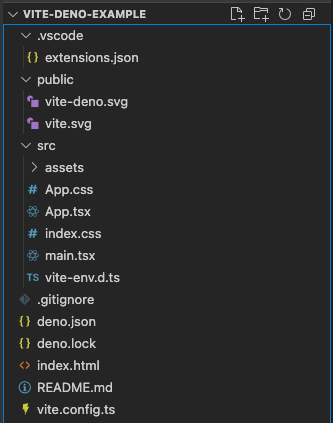
It has almost the same files as the one we created previously. The config files for TypeScriptare missing because TypeScript is a first class language in Deno and it does not require any additional packages to use in our project. Another missing config file is the one for ESlint. This is because Deno CLI includes a linting tool, meaning there is no need to add another lint package.
With this, both the Deno and Node projects are ready to be build or we can start adding more code.
Adding a external package:
In this example we will be adding the react-router-dompackage to both projects
Node
In Node, run yarn add react-router-dom, this will add and install the package to the project.
package.json :
{
  "name": "vite-node-example",
  "private": true,
  "version": "0.0.0",
  "type": "module",
  "scripts": {
    "dev": "vite",
    "build": "tsc -b && vite build",
    "lint": "eslint .",
    "preview": "vite preview"
  },
  "dependencies": {
    "react": "^19.0.0",
    "react-dom": "^19.0.0",
    "react-router-dom": "^7.1.5"
  },
  "devDependencies": {
    "@eslint/js": "^9.19.0",
    "@types/react": "^19.0.8",
    "@types/react-dom": "^19.0.3",
    "@vitejs/plugin-react": "^4.3.4",
    "eslint": "^9.19.0",
    "eslint-plugin-react-hooks": "^5.0.0",
    "eslint-plugin-react-refresh": "^0.4.18",
    "globals": "^15.14.0",
    "typescript": "~5.7.2",
    "typescript-eslint": "^8.22.0",
    "vite": "^6.1.0"
  }
}
And now it can be used in the project code by simply importing in the files we want, for example:
import React from "react"
import { useNavigate } from "react-router-dom"

const SomeReactComponent: React.FC = () => {
  const navigate = useNavigate()

  ...

  return (
    ...
  )
}
Deno
Deno allows two ways to import external packages for the project.
The usual way is to add this library to deno.json on the imports section by running the denoadd command in the terminal:
deno add npm:react-router-dom
Result in the deno.json:
{
  "tasks": {
    "dev": "deno run -A --node-modules-dir npm:vite",
    "build": "deno run -A --node-modules-dir npm:vite build",
    "preview": "deno run -A --node-modules-dir npm:vite preview",
    "serve": "deno run --allow-net --allow-read jsr:@std/http@1/file-server dist/"
  },
  "compilerOptions": {
    "lib": ["ES2020", "DOM", "DOM.Iterable"],
    "jsx": "react-jsx",
    "jsxImportSource": "react",
    "jsxImportSourceTypes": "@types/react"
  },
  "imports": {
    "@deno/vite-plugin": "npm:@deno/vite-plugin@^1.0.0",
    "@types/react": "npm:@types/react@^18.3.12",
    "@types/react-dom": "npm:@types/react-dom@^18.3.1",
    "@vitejs/plugin-react": "npm:@vitejs/plugin-react@^4.3.4",
    "react": "npm:react@^18.3.1",
    "react-dom": "npm:react-dom@^18.3.1",
    "react-router-dom": "npm:react-router-dom@^7.1.5",
    "vite": "npm:vite@^6.0.1"
  }
}
This allows it to be used like the Node example.
There is also another way of importing the package, as shown in the following example:
import React from "react"
import { useNavigate } from "npm:react-router-dom"

const SomeReactComponent: React.FC = () => {
  const navigate = useNavigate()

  ...

  return (
    ...
  )
}
Just make sure that before running the application, you run the command deno install, so the package can be loaded correctly.
Why does Deno allow imports to be done these two ways?
Most of the packages can come with a lot of additional code that may not be used in the project. Therefore, allowing the import to be specified in the file allows us to effectively separate the imports throughout the project only to the required blocks. This helps the developers reduce code bloat.
Deno also comes with a new package registry JSR: https://jsr.io/. That is a new open-source registry that supports TypeScript and prefers ECMAScript modules(ESM). This new registry aims to give developers a better experience for publishing their packages.
The reason we add “npm:” , both in the import and on the deno.json file, is to indicate which package registry to retrieve it from. Support for “npm:” was added with Deno 2.0.
How do you use JSR packages instead of NPM? Simply see if the package is in the registry and import it with “jsr:” instead of “npm:”. To learn more about the imports see: https://jsr.io/docs/native-imports.
Additionally, the creators of Deno are trying to introduce a standard library, https://jsr.io/@std, like the standard Library for C++. By doing so, they hode to remove the need of common big packages, like Lodash, that provide a variety of common code blocks used between a variety of projects. This prevents the developers from adding more code bloat to their projects.
import { toCamelCase, compareSimilarity, toSnakeCase, toPascalCase, toKebabCase } from 'jsr:@std/text';

or

import { toCamelCase } from 'jsr:@std/text/to-camel-case';
Build Performance:
With Deno trying to improve on Node we should compare the builds to see if there is an improvement on that front.
For this test we added another package called “ant design”, which is a React UI component library that will increase the project bundle size.
Node

Deno

As shown, there are small differences in build time, withNode being faster than Deno. However, there is another difference Deno generates a smaller file than Node. This is because Deno better optimizes dead code, leading to that smaller size.
Conclusion
Deno is roughly on the same level as Node and currently only offers small benefits that may make it a good tool for developing a React SPA. It has tools that normally require external packages to be added to the project. Deno also supports using packages from both the JSR and NPM registries. Using NPM with Deno currently doesn’t help on the front preventing project bloat because the packages supplied by NPM are pre-built and don’t allow Deno to optimize dead code.
Currently, most packages used for developing a React SPA do not have a JSR alternative, so the project must use NPM. However, the standard library is an alternative to implementing or adding external packages for commonly needed code blocks.
On build performance there were small differences between the two, but not anything that would sway choosing one over the other. For example, Deno optimizes files better to remove dead code, but currently, most projects will still utilize NPM if switched to Deno.
However, this is the perspective of building a React SPA and this test case may not be the best one to show Deno’s possibilities.
Take this opportunity to try Deno to see how it benefits your projects since the migration from Node to Deno is a simple one.