

Most Single Page Applications (SPA) that we create using the React.js library start simple, but, over time, they tend to increase in complexity, as we add more and more components with different degrees of complexity.
Shouldn’t we look at what is generated to distribute to the browser? If we look into the Build/Distribution folder, often times it generates one index.js and one index.css.
This single index.js file may be small when the app started out but if the application has been growing it may have grown to more than a 1MB. This can affect a users first time loading the application if the their internet performance is weak.
So how can we change the way we write the code so that build, instead of generating a single gigantic file it generates multiple smaller files that can be loaded dynamically as the user navigates through the app, effectively splitting the code?
Thankfully, most bundlers (e.g.: Webpack, Rollup) know how to do this automatically during the build process and we just need to use Dynamic imports. These allow us to tell the JavaScript code how to load the smaller pieces at runtime, instead of adding them all in the same chunk of code.
This blog post explains how to write code using the Dynamic import of components that allow the bundlers to effectively and reliably split the code in to chunks. This allows the runtime to load the code as needed, instead of all at once, improving initial loading speeds. This makes the app more friendly to users with slower internet.
It will also analyze the different approaches that exist in Ruby on Rails for JavaScript delivery. In case the React code is inside a monolith that has React SPA and Ruby on Rails, how can the available approaches deliver this application and support code splitting.
Looking Only at the React Side for Code Splitting:
The app that will serve as example is using Vite tooling tooling and will have the following starting structure:
└── src/
    ├── components/
    │    ├── Component1/
    │    │    ├── style.scss
    │    │    └── index.tsx
    ├── pages/
    │    ├── Home/
    │    │   ├── style.scss
    │    │   └── index.tsx
    │    └── Page1/
    │        ├── style.scss
    │        └── index.tsx
    ├── routes/
    │    └──main.tsx
    ├── App.tsx
    └── main.tsx
It’s also using the following additional libraries:
How to Make Dynamic Imports in React.js ?
Making use of Suspenseand lazy from React.js makes the import of components dynamic, a.k.a. being loaded on runtime.
Here is a simple example of the usage of this component and associated function:
import { FunctionComponent, lazy, Suspense } from "react"
import { Flex, Typography } from "antd"
// Components
import SuspenseFallback from "../../components/SuspenseFallback"

// Dynamic imports
const Component1 = lazy(() => import("./components/Component1"))

const FatherComponent: FunctionComponent = () => {
  return (
    <Flex vertical align="center" justify="center" style={{ height: "100%" }}>
      <Typography.Title>Some Component</Typography.Title>

      <Suspense fallback={<SuspenseFallback />}>
        <Component1 />
      </Suspense>
    </Flex>
  )
}

export default FatherComponent
As the example shows Component1 is wrapped in the Suspense and specify a fallback component in case the one that is lazy loaded takes longer than expected to load.
What can be dynamically import in the code?
Is the Project Using React Router ?
If the project is using React Router (v6 or later) library it’s already a good starting point of what can be Dynamically Imported. The project doesn’t need to have EVERY Page bundled together in to a single index.js. So, changing the static import of the pages to dynamic allows the bundler to split these page components in to separate chunks.
The routes/main.tsx code is written like this:
import { BrowserRouter, Route, Routes } from "react-router-dom"
import NormalLayout from "../layouts/NormalLayout";
import Home from "../pages/Home"
import Page1 from '../pages/Page1'
import NotFound from '../pages/NotFound'

const MainRoutes = () => {
  return (
    <BrowserRouter>
      <Routes>
        <Route element={<NormalLayout />}>
          <Route index element={<Home />} />
          <Route path='/page1' element={<Page1 />} />
          <Route path='*' element={<NotFound />} />
        </Route>
      </Routes>
    </BrowserRouter>
  )
}

export default MainRoutes
With this code the build outputs this:
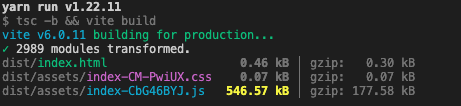
Now changing the code in routes/main.tsx to wrap the BrowserRouter in a Suspensecomponentwith a fallback prop and dynamically importing the Page1 and NotFound using thelazyfunction. Will result in something like this:
import { Suspense, lazy } from "react-router-dom"
import { BrowserRouter, Route, Routes } from "react-router-dom"
import NormalLayout from "../layouts/NormalLayout";
import SuspenseFallback from "../../components/SuspenseFallback"
import Home from "../pages/Home"

const Page1 = lazy(() => import('../pages/Page1'))
const NotFound = lazy(() => import('../pages/NotFound'))

const MainRoutes = () => {
  return (
    <Suspense fallback={<SuspenseFallback />}>
      <BrowserRouter>
        <Routes>
          <Route element={<NormalLayout />}>
            <Route index element={<Home />} />
            <Route path='/page1' element={<Page1 />} />
            <Route path='*' element={<NotFound />} />
          </Route>
        </Routes>
      </BrowserRouter>
    </Suspense>
  )
}

export default MainRoutes
Better yet, instead of wrapping the BrowserRouter if the project has layout routes, this project has a NormalLayout component. Move the Suspense to the inside of the layout where the Outletcomponent is. Leave the lazy in the routes/main.tsx. Theresult is something like this:
NormalLayout:
import { FunctionComponent, Suspense, useEffect, useState } from "react"
import { Outlet, useLocation, useNavigate } from "react-router-dom"
// Components
import SuspenseFallback from "../components/SuspenseFallback"
// Styles
import './style.scss'

const NormalLayout: FunctionComponent = () => {
  return (
    <div>
      <h1>Some header</h1>
      {...}
      <Suspense fallback={<SuspenseFallback />}>
        <Outlet />
      </Suspense>
      {...}
    </div>
  )
}

export default NormalLayout
routes/main.tsx:
import { lazy } from "react";
import { BrowserRouter, Route, Routes } from "react-router-dom"
// Components
// Layouts
import NormalLayout from "../layouts/NormalLayout";
// Pages
import Home from "../pages/Home"

// Dynamic imports
const NotFound = lazy(() => import('../pages/NotFound'))
const Page1 = lazy(() => import('../pages/Page1'))

const MainRoutes = () => {
  return (
    <BrowserRouter>
      <Routes>
        <Route element={<NormalLayout />}>
          <Route index element={<Home />} />
          <Route path='/page1' element={<Page1 />} />
          <Route path='*' element={<NotFound />} />
        </Route>
      </Routes>
    </BrowserRouter>
  )
}

export default MainRoutes
With the changes above the build generates the following output:
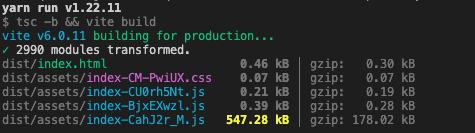
The build of the project generated 2 index-########.js. One for Page1 and another for NotFound.
Why leave the Home component with a static import ? It’s the first page of the application, therefore its left as a static import so the first index.js always includes it. If you’re looking to what pages to leave as static imports, it’s best to leave the Login, Register and any other for that are important for the application’s first time use flow, in my opinion.
Is There More Code That Can Be Dynamically Imported?
Yes. Looking at the components that were used in the routes maybe it is good to look inside each of the pages. Some of the imports can be changed to dynamic imports by scanning the static imports in the pages. The criteria that should impact this decision are:
- Is this a secondary component?
- Is this component a complex and long code chunk?
- Is this a complex component that is reused in many places in the project?
The code for the Home page has been using Component1 as a static import but imagining this component has a complex and long chunk of code and other sub-components specific to it, that are not used in any other place of the project. This makes it a good candidate to be dynamically imported like this:
Component1:
import { Button, Flex, Typography } from "antd"

const Component1 = () => {
  // ALOT MORE CODE

  return (
    <Flex vertical>
      <Typography.Title>Component 1</Typography.Title>

      <Flex vertical>
        <Button>
          Button 1
        </Button>

        <Button>
          Button 2
        </Button>
      </Flex>

      {... ALOT MORE COMPONENTS AND ELEMENTS}
    </Flex>
  )
}

export default Component1
Home:
import { FunctionComponent, lazy, Suspense } from "react"
import { Flex, Typography } from "antd"
// Components
import SuspenseFallback from "../../components/SuspenseFallback"

// Dynamic imports
const Component1 = lazy(() => import("../../components/Component1"))

const Home: FunctionComponent = () => {
  return (
    <Flex vertical align="center" justify="center" style={{ height: "100%" }}>
      <Typography.Title>Home Page</Typography.Title>

      {...}

      <Suspense fallback={<SuspenseFallback />}>
        <Component1 />
      </Suspense>

      {...}
    </Flex>
  )
}

export default Home
With this change the build is now generating one more index.js. Because Component1 was dynamically imported the bundler was able to separate it and it also separated more code in a new file button-#######.js as of result of this dynamic import.
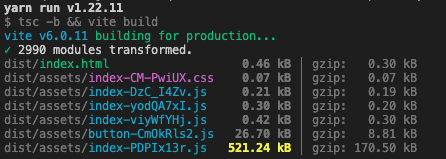
This is one of the approaches that can be taken.
Let’s look at another approach for when adding new code. The project has Page1 and its required to add a new page, named Page2. These two pages have a new component called Form1. This new component is a complex one, and it behaves similar on both pages but it can receive a prop to adjust the desired behavior. Something Like this:
Form1:
import { FunctionComponent } from "react"
import { Button, Flex, Input, Typography } from "antd"

interface Form1Props {
  type: string
  // Add props here
}

const Form1: FunctionComponent<Form1Props> = ({ type }) => {

  const handleSubmit: React.FormEventHandler<HTMLFormElement> = (e) => {
    e.preventDefault();

    console.log('Form submitted');

    // DOES SOMETHING
  }

  return (
    <form onSubmit={handleSubmit}>
      <Flex vertical>
        <Typography>Form 1</Typography>

        <Input placeholder="Input 1" />

        <Input placeholder="Input 2" />

        {type === 'something' && (
          <>
            <Input placeholder="Input optional 1" />

            <Input placeholder="Input optional 2" />
          </>
        )}

        {... EVEN MORE INPUTS ...}

        <Flex vertical>
          <Button>
            Button 1
          </Button>

          <Button type='primary' htmlType='submit'>
            submit
          </Button>
        </Flex>
      </Flex>
    </form>
  )
}

export default Form1
This component is also a good candidate to be dynamically imported in both pages.
Attention: If the component is not dynamically imported in both other components it will not be separated leaving it in the main chunk.
Page1:
import { FunctionComponent, lazy, Suspense } from "react";
import { Flex, Typography } from "antd";
// Static imports
import SuspenseFallback from "../../components/SuspenseFallback";
// Styles

// Dynamic imports
const Form1 = lazy(() => import("../../components/Form1"))

const Page1: FunctionComponent = () => {
  return (
    <Flex vertical justify='center' align='center' style={{ height: '100%' }}>
      <Typography.Title>Page 1</Typography.Title>

      {...Other Components...}

      <Suspense fallback={<SuspenseFallback />}>
        <Form1 type='normal' />
      </Suspense>

      {...More Components...}
    </Flex>
  )
}

export default Page1
Page2:
import { FunctionComponent, lazy, Suspense } from "react";
import { Flex, Typography } from "antd";
// Components
import SuspenseFallback from "../../components/SuspenseFallback";
// Styles

// Dynamic imports
const Form1 = lazy(() => import("../../components/Form1"))

const Page2: FunctionComponent = () => {
  return (
    <Flex vertical justify='center' align='center' style={{ height: '100%' }}>
      <Typography.Title>Page 2</Typography.Title>

      {...Other Components...}

      <Suspense fallback={<SuspenseFallback />}>
        <Form1 type='something' />
      </Suspense>

      {...More Components...}
    </Flex>
  )
}

export default Page2
This build generates an additional index.js, one for the Page2 and another for the Form1. New code was added for the page and the form but the primary chunk didn’t increase its size by a large margin.
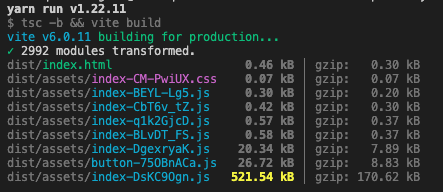
Repository of the Final Code Generated:
https://github.com/runtimerevolution/articles-react-code-split
Ruby on Rails Approaches to distribute Javascript
Ruby on Rails framework has many approaches to deliver JavaScript to the browser. However while looking at these approaches some of them don’t fully support serving a React Single Page Application or support reliable code splitting with dynamic imports.
importmap-rails:
Import maps is the new default, introduced with Rails 7, when we generate a new Ruby on Rails project without specifying any options. It’s a straightforward way of delivering pure JavaScript to the various pages created with the Framework and it can build a reliable front-end experience using Hotwired. However, distributing a full React SPA with this approach is not feasible.
This approach makes use of the gem importmap-rails.
It does support the use of the React.js Library, but JSX can’t be used because import maps approach doesn’t have a transpilation step for jsx, ts and tsx. This issue can be worked around using another library like HTM.
- To learn more, take a look at this discussion: https://community.theforeman.org/t/using-react-with-importmaps-on-rails-7/26946.
To distribute a React SPA, a new step need to be added. Like mentioned above, it also requires a bundling step so that the application can be condensed into a single js file. This defeats the purpose of this approach when there are other options that can do this.
This approach is used more in line when wanting to sprinkle Javascript code inside new or existing html.erb files in your Ruby on Rails project to improve or enhance some of the page behaviors.
jsbundling-rails:
This gem allows the project to be configured as to be able to fully deliver a SPA, since it gives the choice of using bundlers. Focusing only on ESbuild and Rollup.js bundlers as examples of usage and how these can be used to distribute a React SPA and how can this be code split.
ESBuild: It’s one of the most efficient bundlers but it has a caveat. It currently does not have full support for code splitting with dynamic imports. Check: https://esbuild.github.io/api/#splitting. To resolve these issues it may require changes to be made to the configurations of the bundler. They may also need more behavior to be added to our asset pipeline in rails.
Rollup.js: It’s a bundler that is not as efficient as ESBuild but its also included in the the Vite tools for web development which is a tested tooling. It can handle being setup in a Ruby on Rails project and to split the code correctly using dynamic imports.
Shakapacker:
Shakapackeris another option. It’s a gem that is the successor of the Webpacker gem that was previously in Rails versions. It uses Webpack as its bundler. Since it uses a long existing bundler it can be easily configured to distribute a React SPA and also reliably code split it. It also has some other features that make developing with it easier.
Example repository: https://github.com/runtimerevolution/react-rails-shakapacker
It also allows the use of the gem React on Railswhich uses Shakapacker as a base which is a gem that adds syntax to ERB to import and use components in to html.erb files.
A good way to have more tools available for developing a React SPA and also use Rollup as a bundler, while not going for the other gems mentioned above, is Vite Ruby. It’s a good tooling that also allows the use of HMR while developing and has an integration with Rails. And since it uses a bundler that supports code splitting its a good option if we are serving a React SPA in Rails.
Conclusion
This post has shown how to use Dynamic Imports to allow a React Single Page Application to be split into smaller chunks by the bundler using the Suspense and lazy made available by React.js.
In the examples shown above, we have demonstrated that existing code can be easily changed to incorporate dynamic imports. Also showing that when adding new components be it simple or complex ones, the code can be structured so that they can be dynamically imported.
This post also looked at what is available in Ruby on Rails to distribute JavaScript and which of the options could reliably. distribute a React SPA and allow it to be code-split using dynamic imports.
The importmap-rails gemis best used if the project has pure JavaScript and maybe want to sprinkle some of it in your pages relying on Hotwire tooling. Not being an option to distribute a SPA through it.
The jsbundling-rails gem allows us to distribute a SPA but some of the bundlers that can be used may have issues with code-splitting which can lead to big workarounds.
Finally shakapacker gem is an all around option that doesn’t require more extensive configurations other than the initial setup to have the ability to distribute a SPA with dynamic imports and for these imports to be split.